
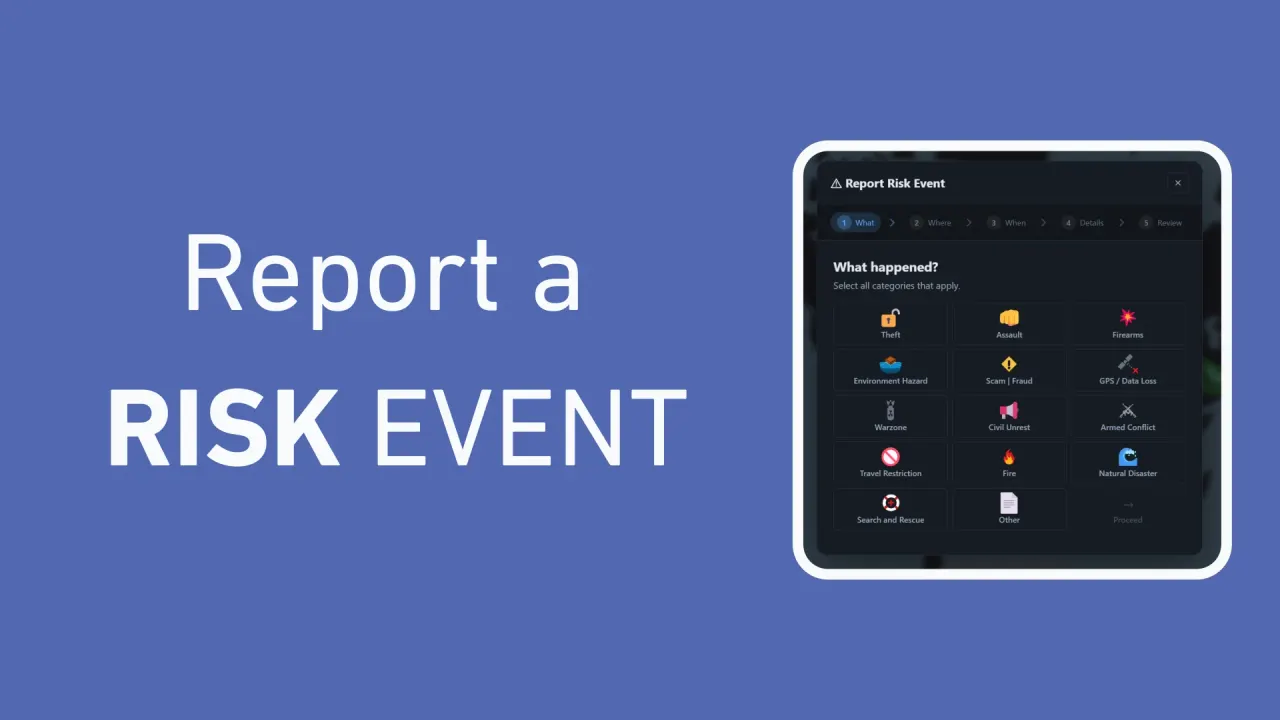
How to Report Risk Events on WAKETRACE
Using the WAKETRACE map, you can report Risk Events which are shared with the community for greater transparency and accountability.
By WAKETRACE Team · · WAKETRACE Guides
This guide shows you step-by-step, how to report a Risk Event on WAKETRACE.
Step 1: What happened?
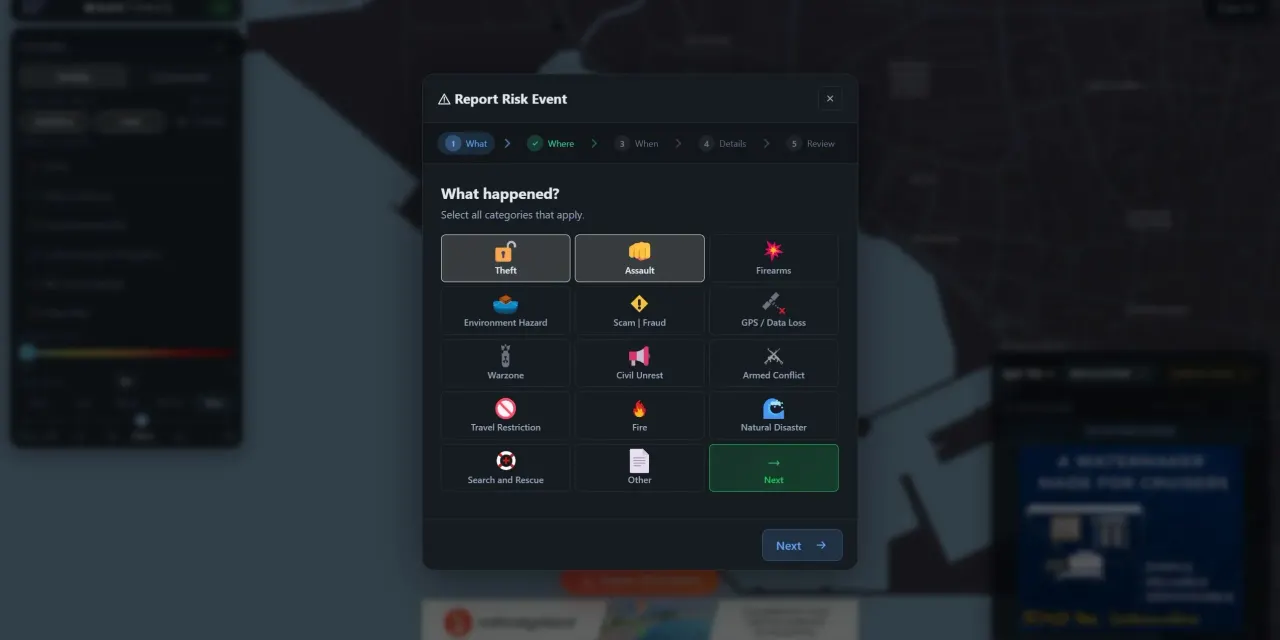
Press Report Risk Event to begin the self-reporting process.
Select which type of risk event you are reporting. There are 14 categories, and you should select all that apply.
- Theft: Stolen belongings, vessels and associated property.
- Assault: A physical attack against a person, with or without melee weapons
- Firearms: A crime where firearms are involved
- Environment Hazard: FADs, sunken vessels, floating abandoned vessels, sea containers, significant debris in the water
- Scam | Fraud: Scams or fraudulent actions by businesses or people near anchorages
- GPS / Data Loss: Total loss of GPS connection or data across an area for inexplicable reasons
- Warzone: Action and events connected to active warzones
- Civil Unrest: Temporary localised loss of government control such as riots, looting, uprisings and protests
- Armed Conflict: A shoot out or gunfight between two or more groups of people
- Travel Restrictions: User reported government travel restrictions
- Fire: Forest fires or marina fires that impact services, safety or air quality
- Natural Disaster: Natural disaster fallout or events connected to natural disasters, infrastructure such as marinas or docks destroyed or water supply down
- Search and Rescue: Search and rescue for missing vessels or crew, which may include BOLO, SECURITE, MAYDAY or PAN PAN alerts
- Other: Anything you feel that the public should be aware of and you would like shared without the risk of systemic information suppression
Once you have selected the relevant categories, press Next.
Step 2: Where did it happen?
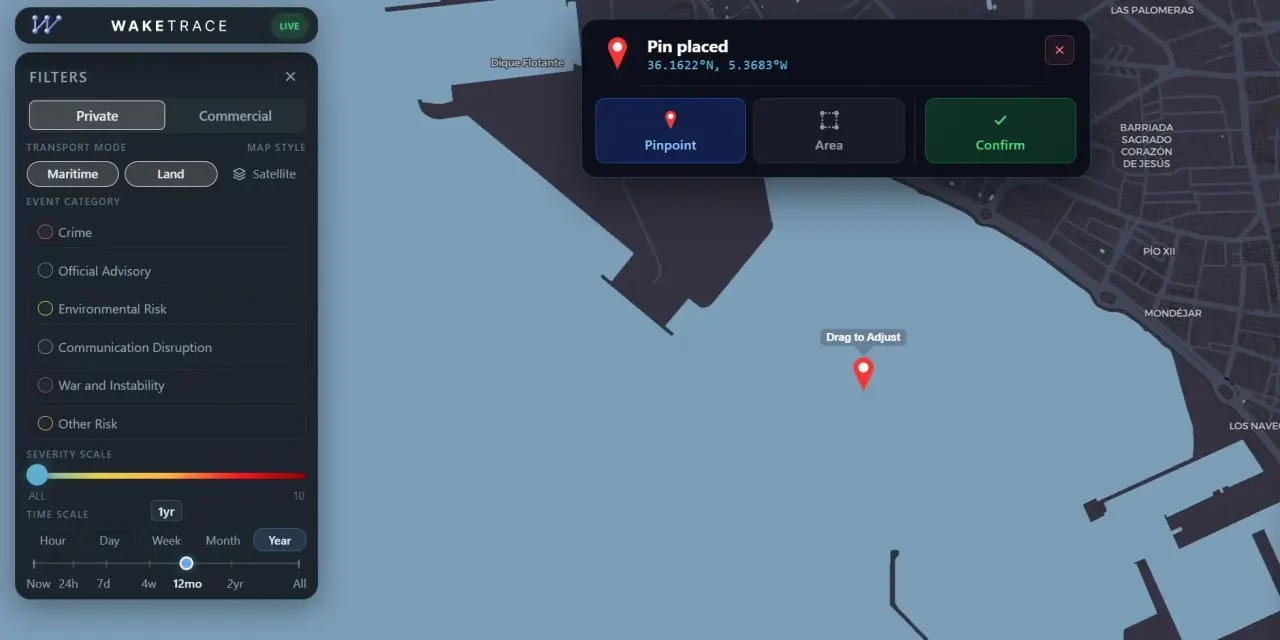
To locate where on the map the event happened, you have three options:
- Press Take Me To My Location to zoom to your current location
- Click the map to place an event pin
- Search a location on the map to zoom to it
Once a pin is placed, you can refine your selection by moving the pin to a precise point, or marking out an area of impact.
Once the correct location has been selected, press Confirm to continue.
Step 3: When did it happen?
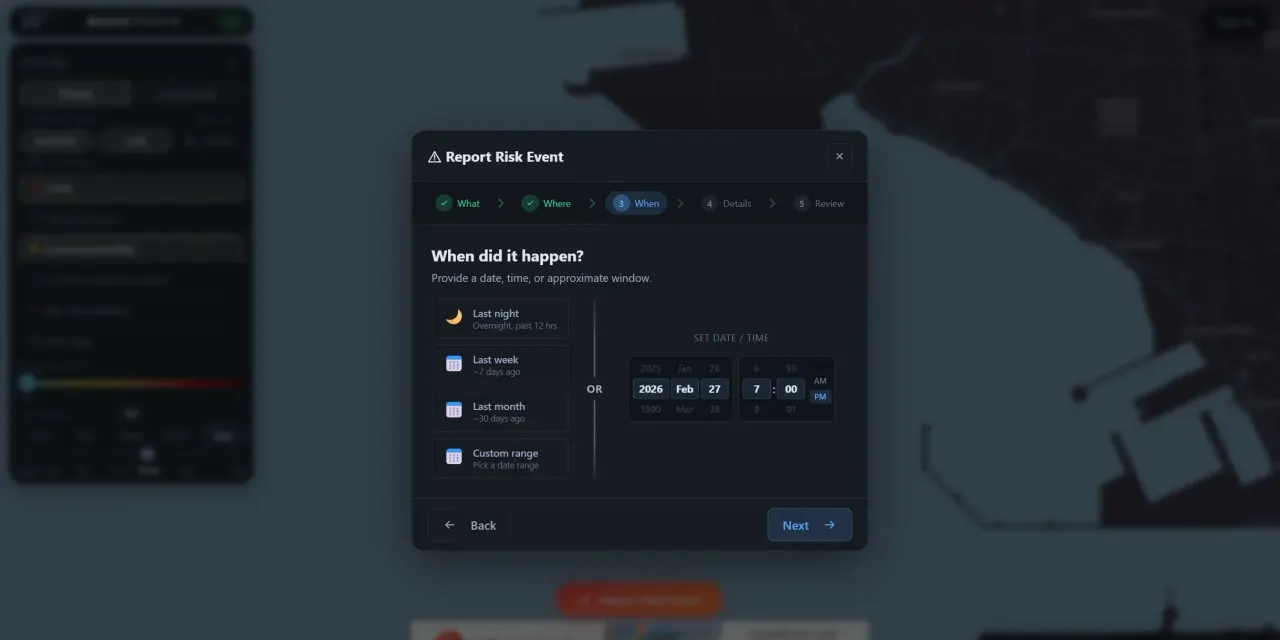
Next you need to select when the event happened. It can be a specific date and time, or an approximate window. There are five default options to choose from which can be customized.
- Set Date / Time: Input a specific date, with the option to add a time
- Last night: 12 hours overnight
- Last week: Date range of the past 7 days
- Last month: Date range of the past 30 days
- Custom range: Input your own custom date range
When the date has been selected, press Next.
Step 4: Provide details
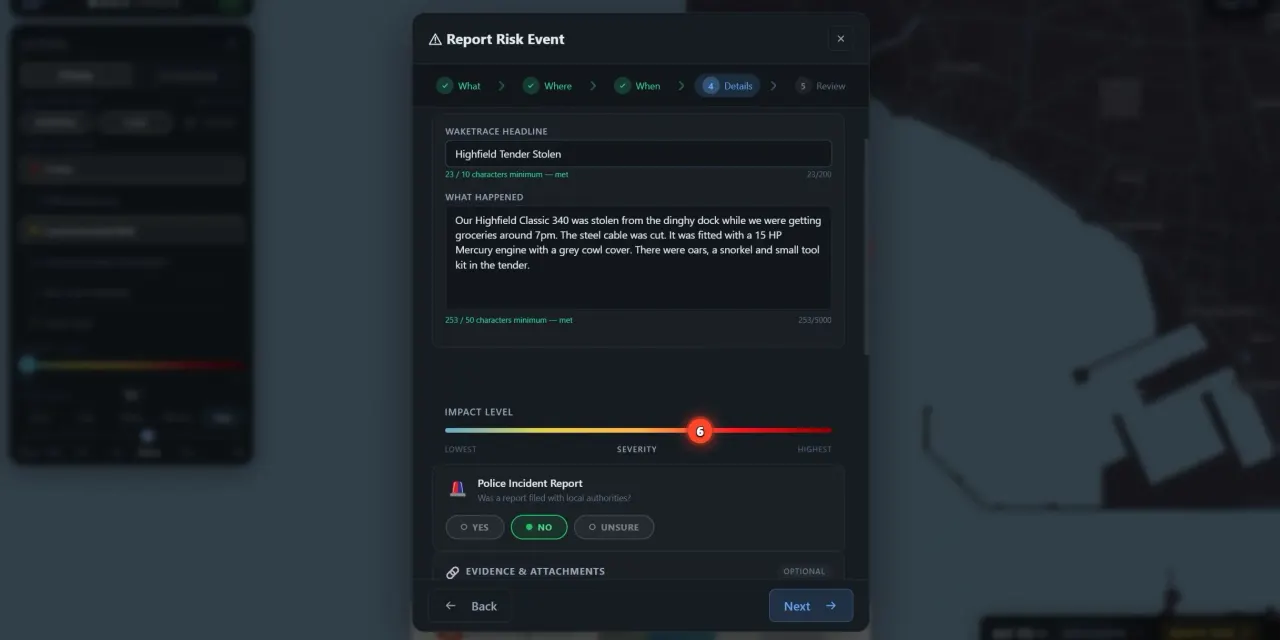
The more details provided in the Risk Event description, the greater value it has to the people reading your report. There are six sections to complete.
WAKETRACE HEADLINE
Give the Risk Event a title that lets readers know what it is about. For example:
My dinghy was stolen from the dinghy dock
Thieves broke into occupied yacht
Hurricane Beryl destroyed mooring field
WHAT HAPPENED
In your own words, describe what happened. Include facts and specific details about the event, such as a list of stolen items, what an intruder looked like, the chronological events that occurred, and any response that took place.
IMPACT LEVEL
This is a subjective severity score that allows users to understand the impact the event has. For example, a stolen fishing rod or cut line may have a lower Impact Level, whereas an armed intrusion or armed intrusion is inherently more serious.
POLICE INCIDENT REPORT
If it was a crime event, then a police report may have been lodged. You are given three choices to answer the question: Was a report filed with local authorities?
- Yes
- No
- Unsure
For users that select Yes the option to upload a police or incident report appears. You will get to choose whether you want to make that report publicly available, or keep it private.
EVIDENCE AND ATTACHMENTS
Attach any evidence, media or links you think will enhance the communities understanding of your report. It could include:
- Photos of stolen items
- Videos of the event
- PDF list of items that were taken
- Links to news articles
- Links to YouTube videos
- Documentation providing a scam
WITNESSES
You can invite people who witnessed this event to add information. They then decide whether to corroborate it and which details to publish.
TRANSPORT TYPES AND EQUIPMENT INVOLVED
To help people sort and filter the data, add tags for the types of transport and equipment that are relevant to the event. For example, theft of a dinghy would be tagged to tender, while a robbery may include knife, cash, mobile phone.
Step 5: Review and Submit
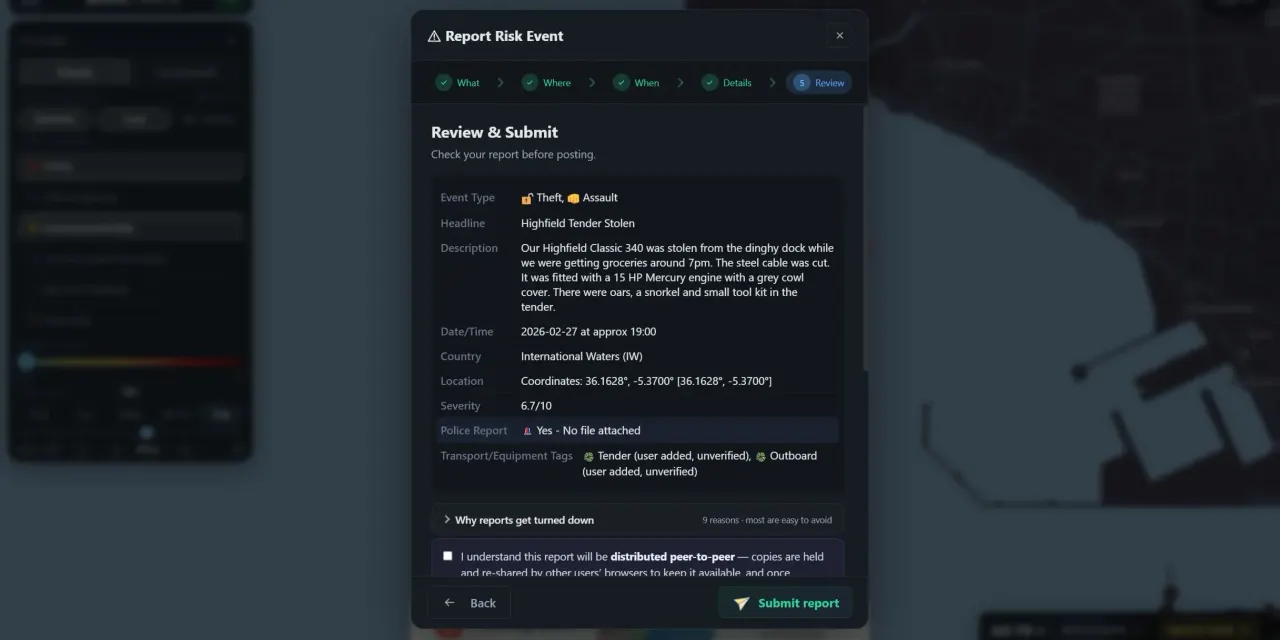
Before posting, check the accuracy of your report by reading the summary.
Confirm you agree to the sharing agreement, then add your information to the Reporter Verification section. This section exists for security and authentication purposes to help prevent spam and false reports, and is not shared publicly on the side. If you already have an account, you can simply login, if you don’t you will need to create a profile to post Risk Events.
When ready press Submit report.
What next?
Your report will be posted to the map, and will be live to the wider community once it passes moderation checks.
Risk Event Reporting FAQ
Can I update a report?
Yes, you can add an update to the report if something changes, for example your stolen property is recovered, or an ongoing situation develops further. To do this:
- Login to your account
- Go to My Activity in the top right
- Scroll down and find the event
- Press Post update and follow the prompts to complete the update
Can I delete my report?
You can request a report be removed from the map by following these steps.
- Login to your account
- Go to My Activity in the top right
- Scroll down and find the event
- Press Remove and follow the prompts to submit a removal request
What happens if my report fails moderation?
In the My Activity section of your account you can see the moderation status of your reports. If a report has been removed by moderation there will be a tag and Moderation update explaining the issue. You do have the option to appeal the moderation if you believe a mistake has been made.